Delta State University has released the Exam Date and Venue for here upcoming pre-degree entrance examination. Candidates are now able to check their individual dates and venue for writing the examination. To check now, simply click here to open the portal for checking. Then enter your application number in the space provided and click check. You venue and date should be made available to your.
Have a great day!
Share this info with your friends on Facebook.
Follow @naijaedutech

Saturday, 25 February 2012


IMSU Releases 2011/2012 Concessional/Third Admission List.
The Imo State University, yesterday 24/2/2012, released their 3rd Admission list, which was tagged "Concessional Admission List".
The list is accessible online with the use of Jamb Registration Number and Scratch Card pin. To check your admission status immediately, click here to access the official portal. On the page that loads up, enter your details and click on "Login".
Wishing you the best!
Follow @naijaedutech
The list is accessible online with the use of Jamb Registration Number and Scratch Card pin. To check your admission status immediately, click here to access the official portal. On the page that loads up, enter your details and click on "Login".
Wishing you the best!
Follow @naijaedutech
FUTO Releases 2011/2012 Final Admission List.
This is to inform all Aspirants for Federal University of Technology, Owerri, Futo that a 4th and probable final list has been released by the institution.
This list was released just on matric day, 24th Feb Night. We therefore advice that all Aspirants should check their admission status immediately to see if they got admission.
This list is available on the school's website. Click here to check your result
Good luck.
Share this information with your friends on FACEBOOK and TWITTER. You can also subscribe to my email feed updates to get my post sent directly to your inbox.
Follow @naijaedutech
This list was released just on matric day, 24th Feb Night. We therefore advice that all Aspirants should check their admission status immediately to see if they got admission.
This list is available on the school's website. Click here to check your result
Good luck.
Share this information with your friends on FACEBOOK and TWITTER. You can also subscribe to my email feed updates to get my post sent directly to your inbox.
Follow @naijaedutech
Monday, 20 February 2012
How To Unlock ZTE Modems.
Unlocking ZTE modems could be very difficult compared to unlocking of Huawei modem. This Afternoon I really had problem unlocking a ZTE modem for one of my clients, so I decided to make some research and I came up with this post courtesy of a great Nigerian tech blogger DON CAPRIO .
Follow the following steps below; Good luck
-First download DC – UNLOCKER 2 CLIENT
-Extract the content of the zip file to a zip folder
-Locate dccrap.exe and run.
-Disconnect your internet connection and plug your ZTE or Huawei USB modem with an alien SIM card (an unsupported SIM card from a different network operator) inserted.
-If you’re to unlocking a Huawei modem, there’s no need to change your SIM. simply plug your modem into your computer’s USB port.
-If the connection manager pops up, close the window.
-Depending on your type of data card, select either ZTE or Huawei from DC – UNLOCKER 2 CLIENT user interface.
-Click on the magnifying glass to automatically search for the modem
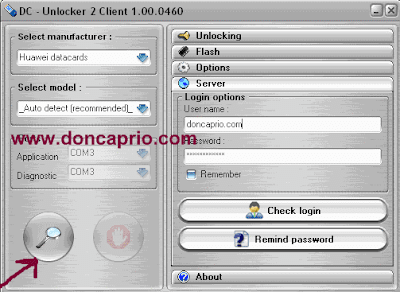
-Once the modem is detected, click on Server and type doncaprio.com in the username field and doncaprio for password.
-Click Unlocking menu, then select unlock.
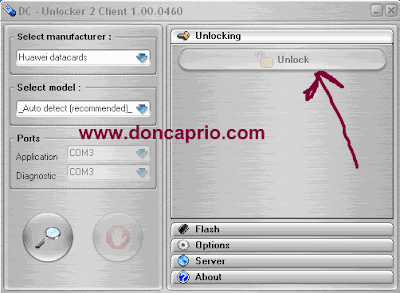
-Wait for a moment till the programs displays this message: unlock is successfully done
-Now you can use any SIM card on your unlocked USB modem
Download ZTE / Huawei modem unlocker from Capriofiles
Download ZTE / Huawei modem unlocker from Hotfile
Follow @naijaedutech
Follow the following steps below; Good luck
-First download DC – UNLOCKER 2 CLIENT
-Extract the content of the zip file to a zip folder
-Locate dccrap.exe and run.
-Disconnect your internet connection and plug your ZTE or Huawei USB modem with an alien SIM card (an unsupported SIM card from a different network operator) inserted.
-If you’re to unlocking a Huawei modem, there’s no need to change your SIM. simply plug your modem into your computer’s USB port.
-If the connection manager pops up, close the window.
-Depending on your type of data card, select either ZTE or Huawei from DC – UNLOCKER 2 CLIENT user interface.
-Click on the magnifying glass to automatically search for the modem

-Once the modem is detected, click on Server and type doncaprio.com in the username field and doncaprio for password.
-Click Unlocking menu, then select unlock.

-Wait for a moment till the programs displays this message: unlock is successfully done
-Now you can use any SIM card on your unlocked USB modem
Download ZTE / Huawei modem unlocker from Capriofiles
Download ZTE / Huawei modem unlocker from Hotfile
Follow @naijaedutech
Friday, 17 February 2012
LATEST UPDATES ON MOZAT TO BE LAUNCHED ON 24 FEB 2012
The guys at Mozat seems not to be resting as they are constantly looking for ways to improve on thier services.I was recieved to receive a mail notifying me of thier latest features due to be launched on the 24th of February.
This is the mail they sent to me, exactly as they sent it.
Follow @naijaedutech
This is the mail they sent to me, exactly as they sent it.
Follow @naijaedutech
FUTO Releases 2012 First Pre-degree Admission List
We wish to inform all prospective students of the pre-degree programme of the Federal University of Technology, Owerri (FUTO) that the first batch of admission list into the programme has been released.
The names published, according to the director of the FUTO pre-degree unit was the names of the students who applied for the programme earlier last month and before.
Meanwhile registration of newly admitted pre-degree students has commenced in earnest. All students who applied should go to the FUTO predegree unit and check for their names on the list pasted on the unit's notice board.
Speculations has it that lectures for the predegree students kicks off on Monday next week.
Congrats. Share this info with your friends on Facebook.
Follow @naijaedutech
The names published, according to the director of the FUTO pre-degree unit was the names of the students who applied for the programme earlier last month and before.
Meanwhile registration of newly admitted pre-degree students has commenced in earnest. All students who applied should go to the FUTO predegree unit and check for their names on the list pasted on the unit's notice board.
Speculations has it that lectures for the predegree students kicks off on Monday next week.
Congrats. Share this info with your friends on Facebook.
Follow @naijaedutech
Monday, 13 February 2012
FUTO Fixes Date For 2012 Matriculation
The school authorities have finally fixed date for the 2011/2012 matriculation of new candidates. The matric has been fixed for the 25th of February.
Congrats to all those who got admitted.
Make sure you invite me.
Share this information with friends on Facebook and twitter
Follow @naijaedutech
Congrats to all those who got admitted.
Make sure you invite me.
Share this information with friends on Facebook and twitter
Follow @naijaedutech
FUPRE Releases 2011/2012 Supplementary List
The Federal University of Petroleum Resources, Effurun fupre has released a few names of lucky students in a supplementary list for admission into the 2011/2012 Academic session.
Aspiring students of the school who are yet to see their names in the admission list are advised to check this list to see if they were lucky to have been chosen to study in the institution.
To view this supplementary list this moment, simply click here.
Wishing you the very best!
Follow @naijaedutech
Aspiring students of the school who are yet to see their names in the admission list are advised to check this list to see if they were lucky to have been chosen to study in the institution.
To view this supplementary list this moment, simply click here.
Wishing you the very best!
Follow @naijaedutech
School fees details for FUOYE
The new Federal University, Oye-Ekiti Fuoye has released the school fees for her pioneering students in the 2011/2012 Academic Session.
The school fees totals up to N89,000 for Faculties of Humanities and of the Social Sciences and N102,000 for the Faculties of Science, Agriculture and of Engineering.
The details of how these fees arrived at the above state are broken down as follows;
Follow @naijaedutech
The school fees totals up to N89,000 for Faculties of Humanities and of the Social Sciences and N102,000 for the Faculties of Science, Agriculture and of Engineering.
The details of how these fees arrived at the above state are broken down as follows;
| Faculties of Humanities and of the Social Sciences | Faculties of Science, Agriculture and of Engineering | ||
| Sundry Fees | Registration | 5,000.00 | 5,000.00 |
| Development Levy | 30,000.00 | 30,000.00 | |
| Examination Fee | 5,000.00 | 5,000.00 | |
| Identity Card | 1,000.00 | 1,000.00 | |
| Library | 7,500.00 | 7,500.00 | |
| Matriculation | 8,000.00 | 8,000.00 | |
| Medical Fee | 5,000.00 | 5,000.00 | |
| Student Handbook | 2,500.00 | 2,500.00 | |
| Sports | 3,000.00 | 3,000.00 | |
| ICT Registration | 5,000.00 | 5,000.00 | |
| University Calendar | 5,000.00 | 5,000.00 | |
| Lab./Workshop Fee | 2,000.00 | 10,000.00 | |
| Field Trip | - | 5,000.00 | |
| Sub Total | 79,000.00 | 92,000.00 | |
| Caution Fee | 10,000.00 | 10,000.00 | |
| Total | 89,000.00 | 102,000.00 |
Follow @naijaedutech
Saturday, 11 February 2012
Nigerian Defence Academy Entrance Examination Date
This is to once more inform all candidates for the exam that the entrance examination into the said academy will take place on the 18th of February 2012,
Candidates are advised to show up on the examination venue on time as the exam is expected to commence by 7:00 am.
Good luck in your exams
Follow @naijaedutech
Candidates are advised to show up on the examination venue on time as the exam is expected to commence by 7:00 am.
Good luck in your exams
Follow @naijaedutech
UNIABUJA Finnaly Releases 2011/2012 Admission List Online
This is to inform all prospective candidates to the University of Abuja that the institution has released their 2011/2012 admission list online. The list can now be accessed online at JAMB WEBSITE.
Good luck
Follow @naijaedutech
Good luck
Follow @naijaedutech
FUTO Releases 2011/2012 3rd Admission List/2nd Supplementary Admission List
This is to happily inform all those who have been expecting their names in the FUTO admission list, that the institution has just released their 3rd admission list and 2nd supplementary admission list. The list is now available and can be checked the the school's website at www.futo.edu.ng. Good luck. see you in FUTO Share this info with your friends on Facebook and twitter.
Follow @naijaedutech
Follow @naijaedutech
Monday, 6 February 2012
Federal University Lokoja (FULOKOJA) 2011/2012 Admission List Is Out
We wish to inform all 2011/2012 prospective students of the new federal university Lokoja that the FULOKOJA admission list for the pioneers students has been released.
The admission list which featured names of lucky students admitted to pursue various degree programmes in the Federal University of Lokoja can be found in JAMB official website.
All candidates who applied for this school and followed their entry requirements are by this announcement urged to kindly log on to www.jamb.org.ng to see if they were among the lucky ones admitted.
Steps to checking FULOKOJA admission status
1. Log on to www.jamb.org.ng.
2. Scroll to and click on "Check Admission" Status
3. Enter your 2011/2012 UTME Reg No, and submit.
4. A pop-up will display your admission status for you.
5. Once admitted, Click here to get your FULOKOJA Original JAMB Admission Letter.
All the best and congrats to admitted students.
Follow @naijaedutech
The admission list which featured names of lucky students admitted to pursue various degree programmes in the Federal University of Lokoja can be found in JAMB official website.
All candidates who applied for this school and followed their entry requirements are by this announcement urged to kindly log on to www.jamb.org.ng to see if they were among the lucky ones admitted.
Steps to checking FULOKOJA admission status
1. Log on to www.jamb.org.ng.
2. Scroll to and click on "Check Admission" Status
3. Enter your 2011/2012 UTME Reg No, and submit.
4. A pop-up will display your admission status for you.
5. Once admitted, Click here to get your FULOKOJA Original JAMB Admission Letter.
All the best and congrats to admitted students.
Follow @naijaedutech
Unlock Your Modem Here
There is no doubt that most modems if not all can only make use of the SIM card of the network provider you get it from e.g If you by it from MTN, You cannot use any other Network with it, But if you Unlock it, It will work with any Network.I make use of both MTN and GLO for my browsing. GLO during the day and MTN during the night. this way I conserve spend less. Now if you have a Modem and you need to unlock it i can help you do that.
What do I do?
1.Text the Modem's IMEI No[ Your Modem IMEI Number is located at the Back of your Modem, Usually Start with 35 ] with an MTN #200 recharge card to 08138543144
2.In a space of 30 minutes I will reply you with the unlock code. Now this is what to do with the unlock code.
3.Remove the Sim Inside the Modem and Put another Network SIM different from the Modem Network, e.g If you are using an MTN Modem, Insert Glo or any other Network SIM apart from MTN, Then Plug it to your PC. A pop-up will Appear asking you to input the unlock code, Insert the unlock code I sent to you Click, Congratulation your modem is unlocked
Follow @naijaedutech
What do I do?
1.Text the Modem's IMEI No[ Your Modem IMEI Number is located at the Back of your Modem, Usually Start with 35 ] with an MTN #200 recharge card to 08138543144
2.In a space of 30 minutes I will reply you with the unlock code. Now this is what to do with the unlock code.
3.Remove the Sim Inside the Modem and Put another Network SIM different from the Modem Network, e.g If you are using an MTN Modem, Insert Glo or any other Network SIM apart from MTN, Then Plug it to your PC. A pop-up will Appear asking you to input the unlock code, Insert the unlock code I sent to you Click, Congratulation your modem is unlocked
NEXT STEP AFTER UNLOCKING YOUR MODEM
After Unlocking your Modem, Maybe its an MTN F@stlink Modem you Unlock, Before you can Browse with Zain Sim or any other SIM in it after Unlocking, You will have to Create a New Profile for Zain or Others, so that you will be able to Browse with Zain SIM using MTN Modem Software on your PC.
After Unlocking your Modem, Maybe its an MTN F@stlink Modem you Unlock, Before you can Browse with Zain Sim or any other SIM in it after Unlocking, You will have to Create a New Profile for Zain or Others, so that you will be able to Browse with Zain SIM using MTN Modem Software on your PC.
Share this Info with your friends on Facebook.
Subscribe to my email feeds to get my subsequent post direct to your email.
Follow @naijaedutech
Subscribe to:
Posts (Atom)